FAQs
Questions about Scripture Forge
-
How does Scripture Forge fit into my translation steps?
Scripture Forge is a tool designed to help you navigate the drafting phase more effectively and quickly while maintaining the quality of your work. It is not a replacement for the translation steps. Instead, think of it as a resource to help you be more productive while drafting and community checking.
-
Does Scripture Forge keep a backup of my project data? Who is responsible for keeping the data safe?
Scripture Forge maintains a version of the project on SIL-controlled servers, and is responsible for keeping that project secure. The project also syncs with your Paratext project, which is stored on the Paratext servers. Be aware that the data does travel over the Internet when you connect to the Scripture Forge interface online.
-
How can I get support or help from the SF team?
You may use the following links to contact us or find support:
- Learning and Documentation: https://software.sil.org/ScriptureForge and https://help.scriptureforge.org
- Report an issue: https://scriptureforge.freshdesk.com/support/tickets/new email: help@scriptureforge.org
- Questions and Support: email: help@scriptureforge.org
Questions on sources and training the model
-
How do I improve the quality of my drafts?
There are 2 primary ways to improve drafts.
- The first is to add more data to the translation model. You can do this by choosing more books in Step 2 - "Select books to train on." The more data available for training, the better the results of the drafts will be.
- The second way is to improve the quality of the data in the translation model. You can do this by making sure the books you have chosen are well checked for consistency in areas such as spelling, punctuation, and content. The better the quality of the data, the better the system will learn to generate good drafts.
- Many teams also see benefit from using an up-to-date back translation as an additional training source.
-
Why do you want me to set a separate training source that isn't my main source?
If there's a text that's more closely aligned with your translation, it may make it easier for the model to learn the relationships between the two languages. A separate training source is not always needed but is an option we provide.
-
How do I change the source or use a different version to train the translation model?
You can change the source of your project by navigating to Settings and then selecting the required one as a resource under "Translate."
-
Why is the book I want not visible in my list of books?
The book needs to exist in both the source and target projects in Paratext. Please ensure this and then run a send/receive in Paratext and a synchronize in Scripture Forge so that Scripture Forge has the latest information from Paratext.
-
Why is there a red exclamation mark when I select a new primary source translation in the Settings page?
It means that setting the source was unsuccessful. You can refresh the page and try again.
Questions on drafting
-
How long does it take to generate my draft?
Drafts currently take roughly an hour and a half to generate, but can sometimes take much longer depending on server availability and the number of books requested. If the draft generation is taking an unusually long time, please reach out to us to report the issue.
-
How will I know when my draft is done?
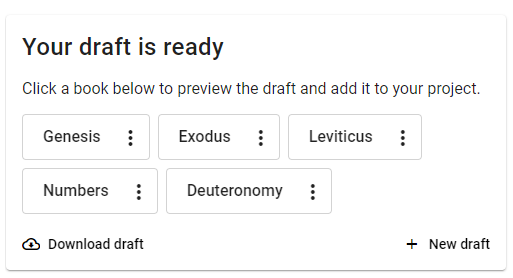
You can opt-in to receive email notifications when your draft generation completes, so you'll be notified immediately. Alternatively, you can check the "Generate draft" page to see the status. When it's done, you'll see a message similar to this:
-
Why does my book only have Chapter 1 in the project?
- Adding a draft to the project happens on a chapter-by-chapter basis from the "Generated draft" tab in the Edit & review page. So if only one chapter is added, it will be the only chapter available in the project. Other chapters will have to be added individually.
- You can add the whole book by navigating to "Generate draft" and finding the draft that has been generated. Click "Add to a project" and choose the project you want to add it to.
-
Why does my button say "re-add to project"?
If you edit a chapter after "adding to project" and want to revert to the unedited SF draft, you can re-import the original draft by clicking the "Re-add to project" button.
-
What does the History tab show?
When you make changes to your draft, Scripture Forge saves a version of those changes that you may access via the history tab. You may revert your project to an older version from here by clicking the "Restore this version" button.
Questions on draft quality warnings
-
Why do I see a warning that my draft may have lower than normal quality? What should I do if I see this warning?
Scripture Forge uses automated metrics to determine whether model training was successful enough to prepare a draft of the requested books. Sometimes these metrics indicate that draft quality may be poor.
The most common reason for this warning is that there is not enough example text of the kind needed to train the model. Usually, this situation results from an error in setting up the draft request. Use the following checklist as a guide to check your draft generation configuration.
- Project: Are you generating the draft from a project that includes all completed books in the project?
- It is important not to request drafts from a project used to store AI drafts.
- If some translated books, such as the New Testament, are stored in a separate Paratext project, you may need to create a new project and import all translated books to that project. You can use that project for draft generation.
- Language codes: Does the language code for each reference and source project match the text of that project?
- You can update language codes in Paratext under “Project properties.”
- Draft Books: Are the book or books to draft selected in Step 2, “Select books to draft”?
- Training Books: Are all the completed and checked books in the project selected in Step 3, “Select books to train on”?
- Be sure all the books used for training have been checked by the team. They should be generally consistent in spelling, character use (keyboarding), dialect, and vocabulary.
- Be sure the reference text contains all the books used for training, and that they are selected at the bottom of Step 3.
- Back Translations: Are you using a back translation as a reference project? If so, check these things:
- Be sure the back translation language code represents the language of the back translation and not of the main translation project.
- If any books in the back translation project are in a different language than the rest of the back translation, unselect those books from the back translation area at the bottom of Step 3.
- Additional Data: Is it formatted correctly?
- If you uploaded additional data for model training on the “Configure sources” page, be sure that each row of that file contains sentences with the same meaning, with the source language on the left and the target language on the right.
- Project: Are you generating the draft from a project that includes all completed books in the project?
-
Why do I still see a low draft quality warning after completing all the checks?
Remember that draft quality is only an estimate and may not reflect human judgment. Please review the draft carefully to determine whether it is useful in your translation work. The help text about Understanding Draft Quality may be helpful.
If draft quality is still low after completing the recommended checks, you may need to translate more text before generating a draft. Early in a translation project, the choice of which book to draft next is important. For example, a model trained on the book of Luke is better prepared to draft Mark than to draft Romans. If you are working in the New Testament, please review the Guidelines for New Testament Draft Generation to learn about how book sequence can affect draft quality.
-
What should I do if only some of the books I generated have a low draft quality warning?
A warning on any draft is a good reason to consider the checklist above. However, it may also be the case that your training data was a better fit for drafting some books than others. It is important to review each book draft carefully, especially those with a low quality warning, before deciding whether to use it in your translation process.